
View Prototype
The Challenge
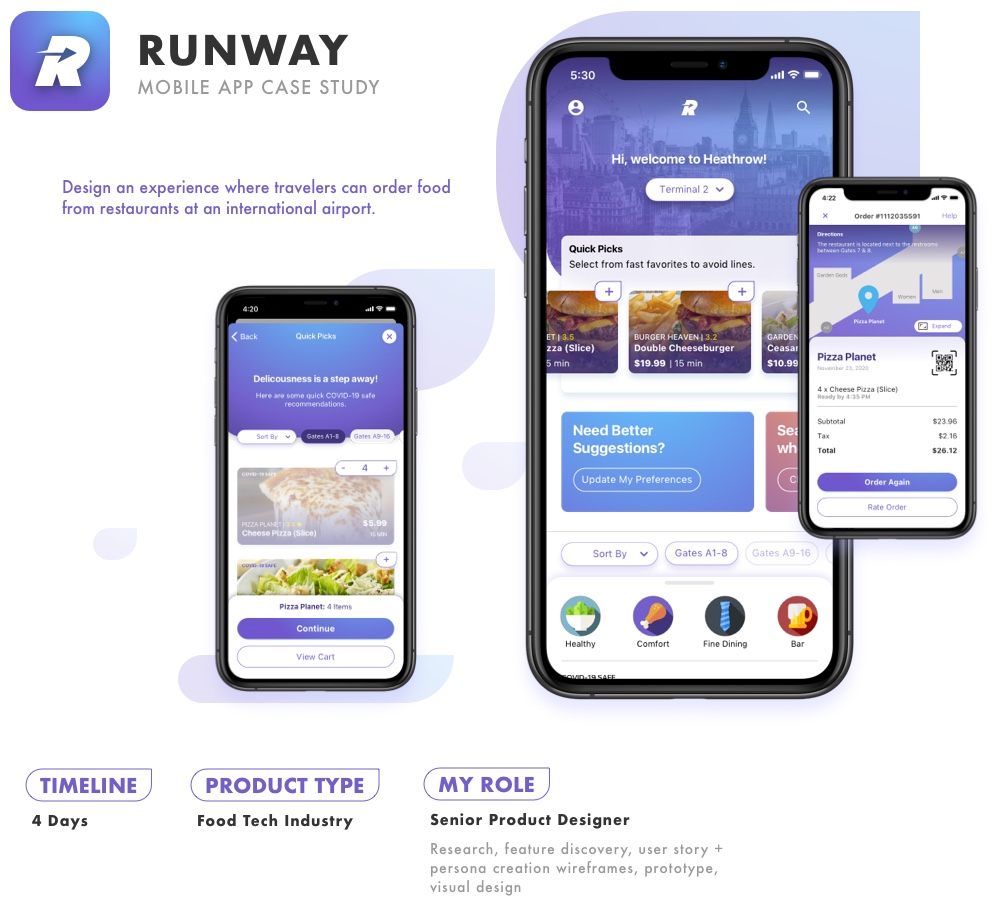
Traveling can often be hectic and things may come up that affect your plans. Design an experience where travelers can order food from restaurants at an international airport.
MY PROCESS
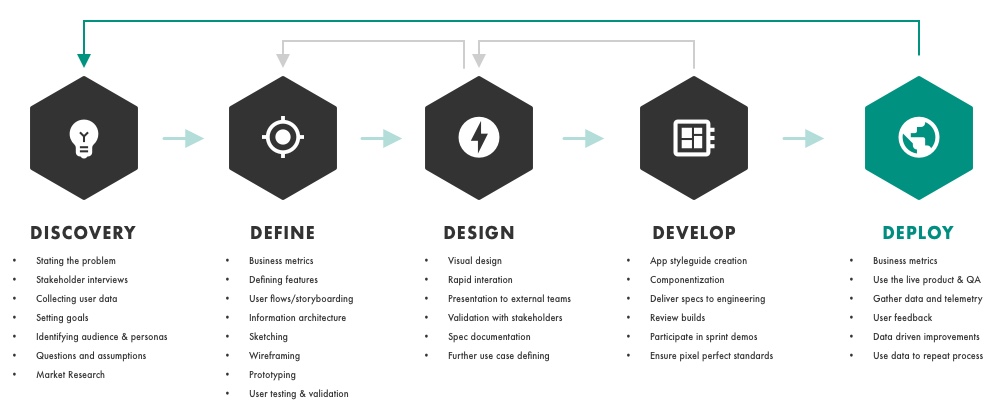
Discover
The Problem
Travelers are too busy getting through confusing airports and they have no convenient way of knowing what food they should eat that is near their location or gate.
Main Goal
Create an app that allows travelers like Abigail to easily order food at nearby restaurants in the airport so she does not have to waste any time wandering the terminal.
Breaking Down The Goal
At this point it is important to consider some of the necessary goals that can help achieve the main goal:
-
- Present relevant restaurant/food options for customers in the airport
- Guide customers to get their food in a more efficient manner
- Consider allowing users to schedule orders
User Goals/Tasks
-
- Discover what food is nearby
- Order food
- Find restaurant and pickup food


Questions & Brainstorming
It is important to consider all of the questions I have for a new experience. Asking these to myself helps me develop feature ideas and narrow in on the primary goals for the app experience.
I went through more than 20 questions and ideas, some of which were:
-
- Can customers schedule in advance
- Can we use location-based notifications
- Can customers set reminders to alert them
- Can we use AR with the camera to deliver directions for restaurants
- Can customers add flight info in advance to deliver suggestions to schedule
- Can customers cancel orders after purchase
- Can we integrate airline trip check API to obtain flight information for suggestions
- Can we show suggested meals proactively
Knowing The Audience
At this point it is very important to discover who the primary customer is through the creation of personas, customer goals, and journeys. This helps narrow down the scope to focus on the key customer needs by empathizing with them.
This is a great time to interview people and gather feedback in order to develop the mindset of the customer.
Audience
1). Primary: traveler at the airport terminal
2). Secondary: travelers who may want to schedule orders from home
Meet Abigail
As a married mother of two young boys, Abigail loves to take the family with her on a variety of vacations. She always feels like she is overly busy while getting through the airport, managing the two children, and searching for food which causes her to feel frustrated with the process.
“When I am getting through the airport, I want to find food for the family quickly so I am not lost and nobody is hangry.”
– Abigail James
Abigail’s Feelings/pain-points
-
- She is overwhelmed with activities in the terminal
- She is concerned about making sure the kids have a safe food option
- She hates not knowing where the restaurants are
- Feels pressured while not knowing how long food may take before a close flight
Abigail’s Goals
-
- Be provided with quick food suggestions
- Know exactly where restaurants are in the terminal
- Keep track of the orders and timing for pickup
- Be guided to the restaurant
- Wants the process to be as quick as possible
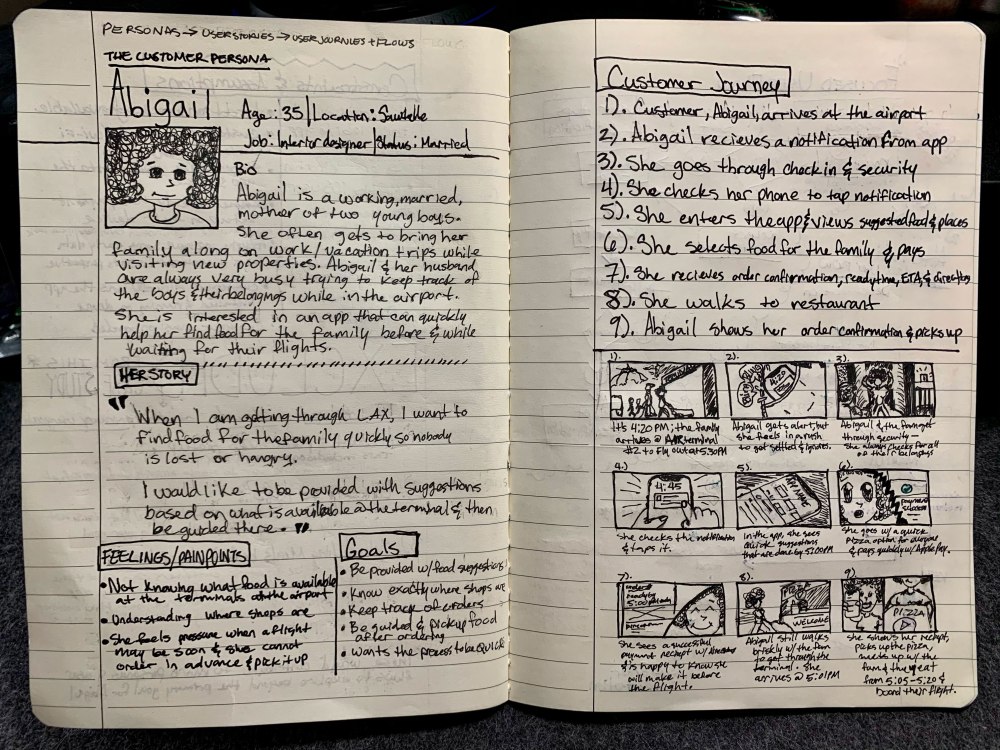
Abigail’s Journey
Here is what Abigail experiences once she leaves her home
-
- Abigail arrives at the airport
- She receives a notification from the app at the terminal
- She goes through check-in and security
- She checks her phone to tap the notification
- She enters the app and views suggested foods
- She selects food for the family and pays
- She receives the order confirmation with ready time and directions
- She walks to the restaurant
- Abigail shows her confirmation and picks up the food
Define
After understanding the customer, it is important to narrow the focus on the key requirements based on customer needs. Here is where I address constraints, assumptions, exclusions from the scope of this study, and research.
I also focus on defining the broad customer flows, competitive research, and feature defining.
Product Requirements
Proactively Efficient
-
- Notify customers in advance with quick food options
- Allow customers to pay with the quickest methods
- Display all restaurants in the terminal
Clarity
-
- Show customers where restaurants are located in the terminal
- Show where restaurants are in relation to their gate
- Display time ranges for food readiness
Assumptions
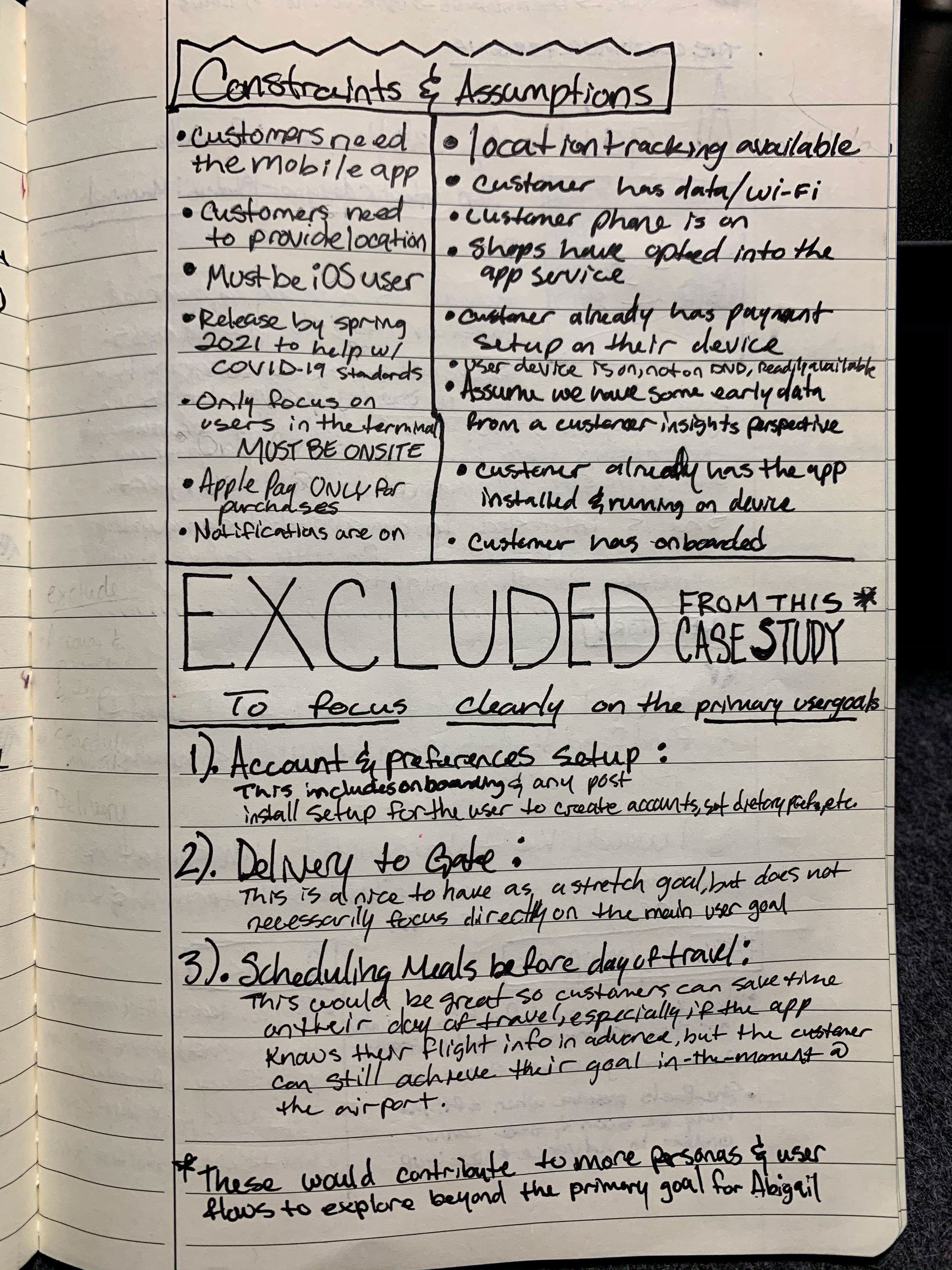 These assumptions were made in order to carry out this vision
-
- Abigail gave the app location access
- Abigail has data/Wi-Fi available
- Abigail has Apple Pay set up
- Abigail onboarded with the app earlier
- Notifications are allowed and active
- Restaurants are signed up with the service
Constraints
-
- Creating constraints helped focus on the primary customer and flow that helps accomplish Abigail’s goals:
- Customer (Abigail) needs the mobile app
- Location access is needed
- Must be iOS user
- Must release by Spring 2021 to help with COVID-19 safety
- Customer must be on-site to get contextual alerts
- Apple Pay only for quick purchases
Excluded Flows
Many flows exist for this app, so I want to target the main case after addressing each possibility and their impact for Abigail:
1. Account & preferences setup
This includes onboarding and any post-install setup for the customer to create accounts, set dietary restrictions, etc.
2.Delivery to the gate
This is a very nice to have as a stretch goal, but it does not necessarily focus directly on the main customer goal.
3. Scheduling meals before the day of travel
This includes onboarding and any post-install setup for the customer to create accounts, set dietary restrictions, etc.
This will eventually be great to focus on so customers can save time while they journey through the airport, especially if the app knows their flight details in advance. However, Abigail can still achieve her goals.
All of these would contribute to more personas and customer flows to explore beyond our primary goal for Abigail.
Research
 Related apps
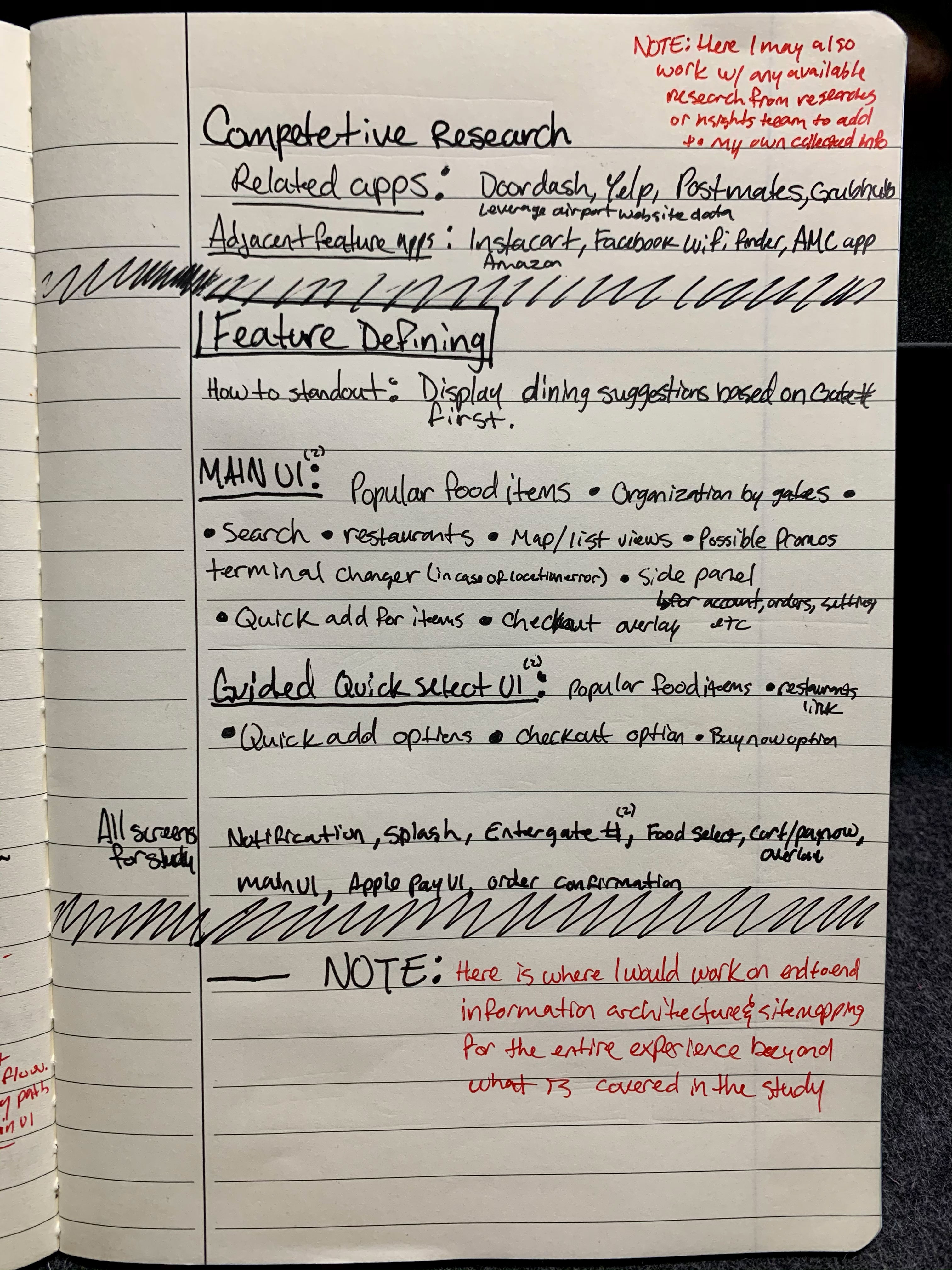
Doordash, Yelp, Postmates, Grubhub, UberEats
Other apps with interesting features
Instacart, Facebook, AMC, Amazon
Feature Defining
Main UI
Popular food items • Organization by gates • Search • Restaurants • Map/list views • Possible promotions • Terminal changer • Side panel/account • Quick add for items • Quick checkout
Guided Quick UI
Popular foods | Restaurants link? | Quick add | Quick checkout
Customer Flows
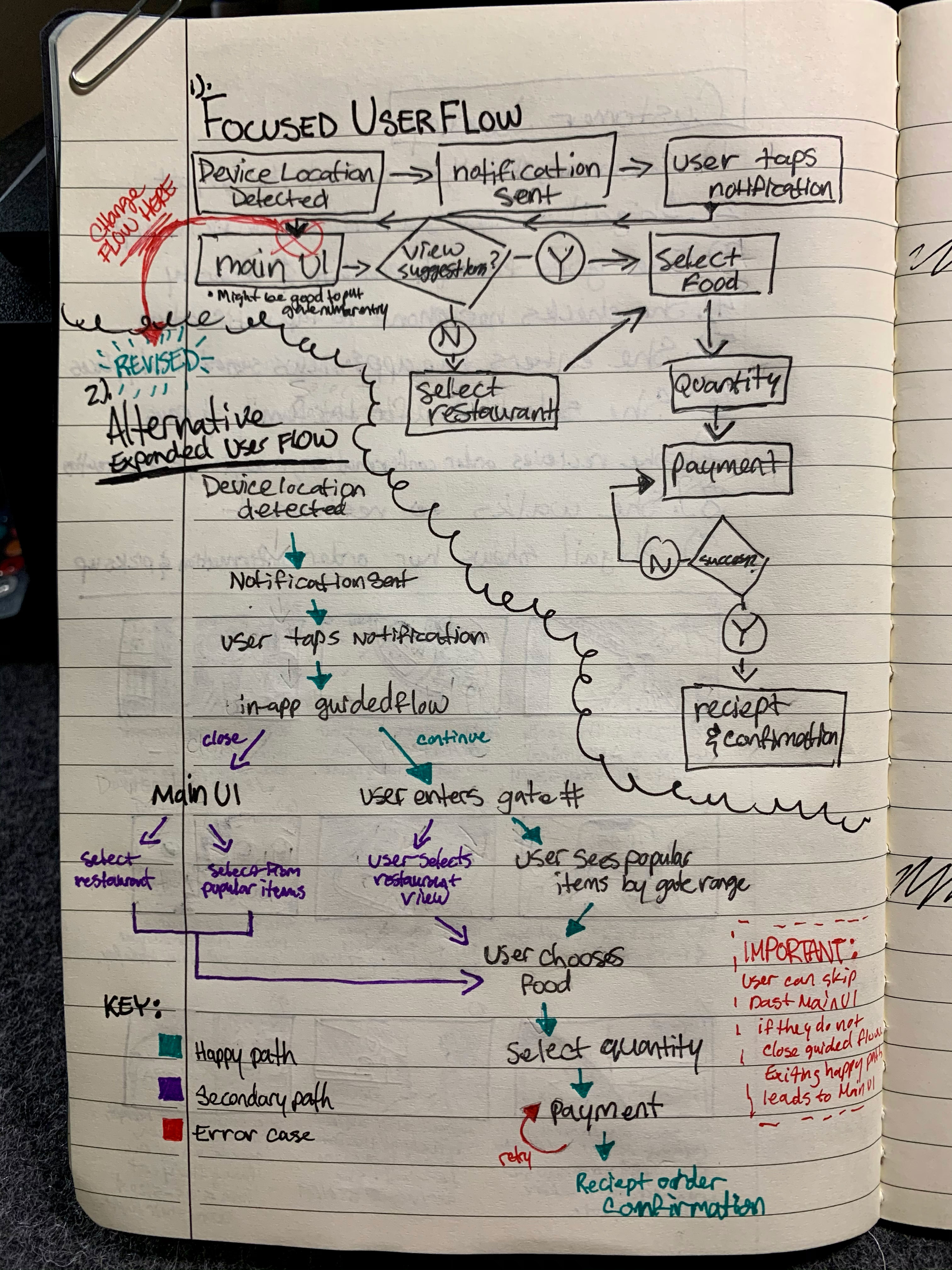 These flows are a high level look at how Abigail will navigate through the app during her journey.
Flow #1: Focused user flow
My first draft was a flow that could distill the experience into a very quick flow, but after thinking about this, I realized that dropping a user on the main UI is less than ideal as it may be overwhelming in the moment.
The main UI might have too much information for a customer in a hurry.
Flow #2: Expanded Flow
I decided that it was important to take customers from the contextual notification to a guided flow with a distilled experience in order to have Abigail focus on her options more clearly.
Adding in the quick guided UI allowed me to create the option for users to stay in a limited, but efficient flow or close and access the main UI if they want to expand their search to more than quick food options (restaurants, food types, and other suggestions).
Wireframing & Prototyping
Once the goals, requirements, features and broad flows are understood, then it is important to consider the structure of that information. This is critical to ensuring Abigail can complete her goals efficiently.
Once the structure is set, then prototyping it, user testing it, and iterating based on the received data occurs.
Wireframe Sketches
Drawing out each major UI helps me make quick changes and address what works in a short amount of time.
Wireframe first drafts
I started converting the high level user flow and features into screens with the information structure in a way to achieve Abigail’s goals. I periodically went back through the ideas and marked places for improvements in pink.
Iteration, systems, and interaction
I considered what is necessary to create a system for modals and other UIs by laying out the basic blocks of information. It was important to consider how elements change, appear, and expand when interacted with.


Final Wireframes
I created the primary screens and then put together a prototype to examine them and iterate. I usually use this time to run user tests and iterate on experiences based on the valuable feedback. This prototype was important because I can see how a customer may have obstacles in a flow.
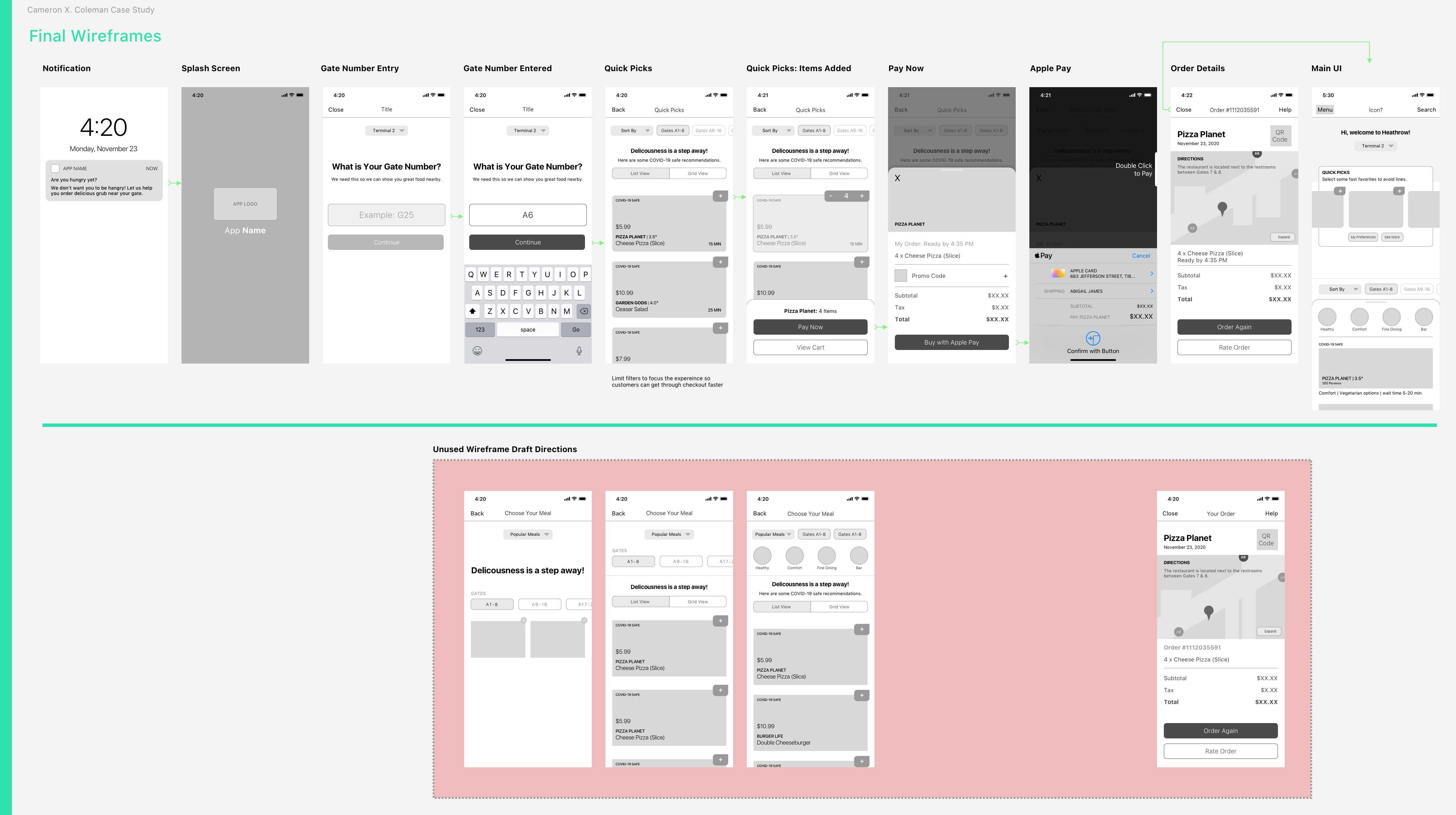
In this phase, I was able to iterate and remove certain elements from UIs that distracted from the primary focus in the flow and thus slowing the process of ordering food (UIs in the red area were earlier ideas).


Visual Design
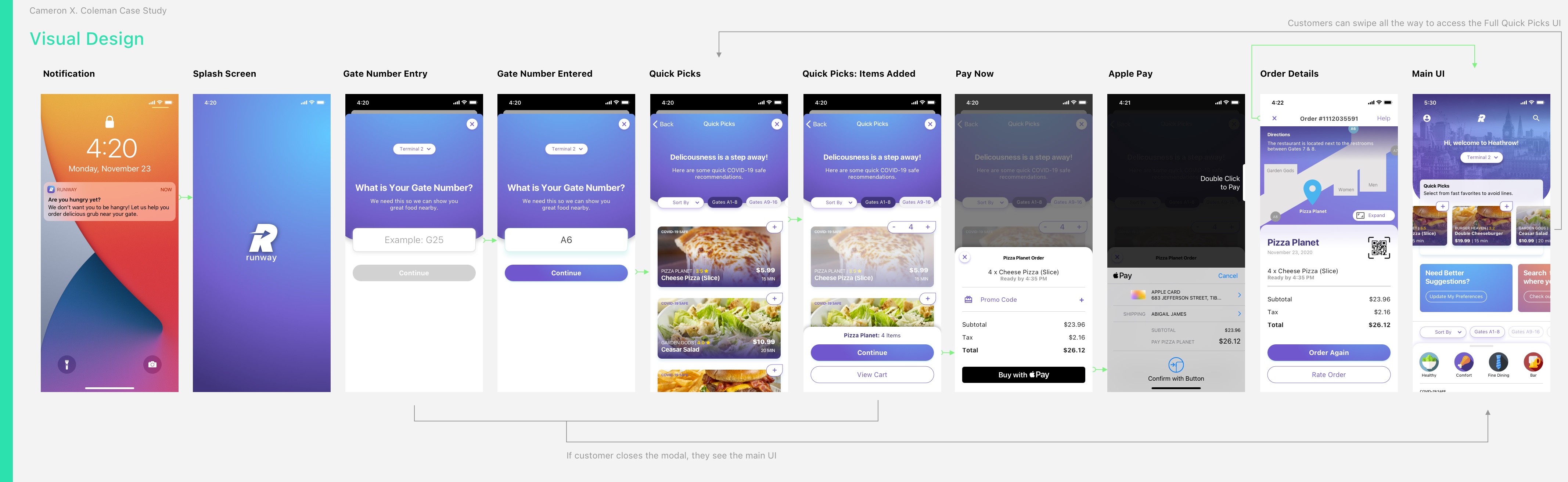
It was very important to refine some of the UIs to remove elements that may not be necessary. The Quick Picks UI was a heavy focus because it is the primary way a customer will select their food and I was able to streamline it further by giving customers one view type for the information.
Also, I decided on a color palette that would put customers like Abigail at ease while trying to decide what to order.


 Cameron Xavier Coleman: US Senior Manager, Product Design